On my last hollidays, I made two HTML5 games, and published on android market. Nowadays javascript has powerful libraries for doing almost everything, and also there are several compilers from java or c code to javascript, converting opengl c code to html5 canvas, but definitely, javascript execution is slower than dalvik applications, and of course much slower than arm c libs. For improving the speed of sounds and images loader, I have used javascript asynchronous execution and scheduling priority has been controlled with setTimeout/setInterval which deprioritize or priorize a code block. This games are published on the android market here: Android Planets and here: Far Planet Related word

sábado, 25 de abril de 2020

viernes, 24 de abril de 2020
Paquete: Taller de ortografía y redacción
El entorno laboral actual requiere de profesionistas capaces de expresarse por escrito de forma clara, coherente y con
impecable ortografía. Este curso en línea está enfocado en abordar las principales reglas ortográficas del idioma
español y en otorgar recomendaciones a los participantes para una redacción correcta de los textos profesionales o
de negocios más comunes tanto tradicionales como digitales.
Paquete: Taller de ortografía y redacción para profesionistas y negocios. (Curso en línea en vivo)
Sáb 09/05/20 | 10 am a 12 pm | Taller de ortografía básica para profesionistas y negocios.
Sáb 23/05/20 | 10 am a 12 pm | Taller de redacción para profesionistas y negocios.
Sáb 06/06/20 | 10 am a 12 pm | Redacción de documentos y textos ejecutivos.
Cada uno: $ 1,150.00 + IVA
Adquiriendo los tres: $2,600 + IVA
Incluye: Conexión al curso para una computadora o móvil, Material del curso, Reconocimiento, Interacción en directo para resolución de dudas.
Proporcionaremos a los participantes guías para una correcta redacción de textos que sean claros, concisos y entendibles
para el ámbito profesional.
Temario:
1 - Nociones básicas de gramática funcional.
2 - Errores frecuentes de redacción.
3 - Vulgarismos y vicios del lenguaje.
¿Te interesa este curso?
Solicita información respondiendo a este correo con la palabra Redacción, junto con los siguientes datos:
Nombre:
Teléfono:
Empresa:
Correo Alterno:
¿Dudas sobre este Evento?
Centro de atención a clientes:
Llámanos al (045) 5530167085 - (045) 55 85567293 - (045) 5530167085 6630
jueves, 23 de abril de 2020
Catalogo de Cursos Online - Como Enfrentar la Crisis por la Pandemia de COVID-19
Nuestro país, como el resto del mundo, atraviesa una situación sin precedentes en la historia moderna. El COVID-19 amenaza con poner de rodillas hasta a las más grandes compañías, y hasta los empresarios con más experiencia se encuentran navegando la situación con comprensible incertidumbre.
Por ello traemos a su alcance los siguientes PROGRAMAS ONLINE más completos con los mejores tips para asegurar la supervivencia de su empresa de transporte:
Curso 1 - Alternativas Emergentes para el Cumplimiento de Obligaciones Fiscales para
las Empresas de Transporte - ante la Crisis por la Pandemia.
11 de Mayo - 10:00 a 14:00 hrs.
Curso 2 - Efectos Laborales, Fiscales y de Seguridad Social en las Nóminas ante la Crisis
por el COVID-19.
12 de Mayo - 10:00 a 13:00 hrs.
Curso 3 - Retención de Operadores ante la Crisis Ocasionada por el COVID-19 y sus
Secuelas.
18 de Mayo - 10:00 a 13:00 hrs.
Curso 4 - Cómo Ejecutar una Operación Responsable en los Centros Logísticos y de
Transporte ante el COVID-19.
19 de Mayo - 10:00 a 14:00 hrs.
Curso 5 - Gestión del Capital Humano en la Empresa de Transporte en Tiempos de Crisis.
20 de Mayo - 15:00 a 19:00 hrs.
-APROVECHE DESCUENTOS EXCLUSIVOS AL ADQUIRIR MÁS DE 2 CONEXIONES-
Si desea adquirir el TEMARIO o más información de estos cursos RESPONDA a esta invitación con los siguientes datos:
Curso ó Cursos de Interés:
Nombre Completo:
Empresa:
Teléfono:
Email: artevisual2.delarteatusojos@blogger.com
Email Alternativo:
Número de Participantes:
y un ejecutivo le hará llegar la información a la brevedad.
Call Center: 800.212.0746
Mensajes vía WhatsApp: (55)6896.43.61
Lic. Suria Herrera, Ejecutiva Comercial,¡Será un placer atenderle!
Este mensaje le ha sido enviado como usuario o bien un usuario le refirió para recibirlo. Si no pertenece al sector y no desea recibir actualizaciones al respecto, responda a esta invitación con la palabra BAJA DEFINITIVA.
Por ello traemos a su alcance los siguientes PROGRAMAS ONLINE más completos con los mejores tips para asegurar la supervivencia de su empresa de transporte:
Curso 1 - Alternativas Emergentes para el Cumplimiento de Obligaciones Fiscales para
las Empresas de Transporte - ante la Crisis por la Pandemia.
11 de Mayo - 10:00 a 14:00 hrs.
Curso 2 - Efectos Laborales, Fiscales y de Seguridad Social en las Nóminas ante la Crisis
por el COVID-19.
12 de Mayo - 10:00 a 13:00 hrs.
Curso 3 - Retención de Operadores ante la Crisis Ocasionada por el COVID-19 y sus
Secuelas.
18 de Mayo - 10:00 a 13:00 hrs.
Curso 4 - Cómo Ejecutar una Operación Responsable en los Centros Logísticos y de
Transporte ante el COVID-19.
19 de Mayo - 10:00 a 14:00 hrs.
Curso 5 - Gestión del Capital Humano en la Empresa de Transporte en Tiempos de Crisis.
20 de Mayo - 15:00 a 19:00 hrs.
-APROVECHE DESCUENTOS EXCLUSIVOS AL ADQUIRIR MÁS DE 2 CONEXIONES-
Si desea adquirir el TEMARIO o más información de estos cursos RESPONDA a esta invitación con los siguientes datos:
Curso ó Cursos de Interés:
Nombre Completo:
Empresa:
Teléfono:
Email: artevisual2.delarteatusojos@blogger.com
Email Alternativo:
Número de Participantes:
y un ejecutivo le hará llegar la información a la brevedad.
Call Center: 800.212.0746
Mensajes vía WhatsApp: (55)6896.43.61
Lic. Suria Herrera, Ejecutiva Comercial,¡Será un placer atenderle!
Este mensaje le ha sido enviado como usuario o bien un usuario le refirió para recibirlo. Si no pertenece al sector y no desea recibir actualizaciones al respecto, responda a esta invitación con la palabra BAJA DEFINITIVA.
WEBINAR GRATUITO TEMA: RESILIENCIA, CÓMO AFRONTAR LA CRISIS"
🔴WEBINAR GRATUITO 👉 "Resiliencia, cómo afrontar las crisis"
📆Fecha: 24 de Abril
⏳Duración: 1.30 hrs.
⏰Horario: 7pm
Beneficios:
✅Este webinar está diseñado para que los participantes desarrollen la capacidad de lograr adaptarse bien ante las tragedias, los traumas, las amenazas o el estrés severo.
✅Aprenderás qué tipo de conductas y formas de pensar puedes empezar a desarrollar.
✅Desarrollaras diversas maneras de controlar las emociones, ante adversidades y mantener la concentración ante situaciones de crisis.
✅Desarrollar empatía y sensibilidad social y tener un buen desempeño en situaciones interpersonales .
Si te interesa tomar el curso, solo requiero que me compartir: nombre y correo electrónico de quienes lo tomarían, esta abierto al publico en general por lo que puedes inscribir a todos los colaborares que tu decidas.
También puedes inscribirte por whatsappdirecto, da click aqui👉https://bit.ly/3btyULa
ó via correo electrónico.
Saludos
Noemi Mendoza
Movil.55 643 632 57


SANS SEC575 Mentor Class
Hi everyone,
Great news! I will be mentoring SANS 575: Mobile Device Security and Ethical Hacking in Luxembourg on Thursday evenings 18:00-20:00, starting from January 15, 2015.
Mentor classes are special, 10 week-format SANS classroom sessions that give the students time to absorb and master the same material with the guidance of a trained security professional.
Students receive all the same course materials used at SANS conferences and study at a more leisurely pace, so students will have:
Students receive all the same course materials used at SANS conferences and study at a more leisurely pace, so students will have:
- Hardcopy set of SANS course books
- Mentor Program study materials
- Weekly Mentor led sessions
Prior to the weekly Mentor-led classroom sessions, students study SANS course material at their own pace. Each week, students meet with other professionals in their hometown area and the SANS mentor, who leads topical discussions pointing out the most salient features of the weekly material studied, provides hands-on demonstrations, and answer questions. The Mentor's goal is to help student's grasp the more difficult material, master the exercises, demonstrate the tools and prepare for GIAC certification.
On SANS SEC575, we will learn about mobile device infrastructures, policies and management, we will see the security models of the different platforms, like the data storage and file system architecture. We will also see how to unlock, root and jailbreak mobile devices in order to prepare them for data extraction and further testing. In the second half of the course, we will learn how to perform static and dynamic mobile application analysis, the usage of automated application analysis tools and how to manipulate application behavior. Last but not least, we will see how to perform mobile penetration testing that includes fingerprinting mobile devices, wireless network probing and scanning, attacking wireless infrastructures, using network manipulation attacks and attacks against mobile applications and back-end applications.
For more info, here is the link for the class: http://www.sans.org/mentor/class/sec575-luxembourg-15jan2015-david-szili
My Mentor bio: http://www.sans.org/mentor/bios#david-szili
On SANS SEC575, we will learn about mobile device infrastructures, policies and management, we will see the security models of the different platforms, like the data storage and file system architecture. We will also see how to unlock, root and jailbreak mobile devices in order to prepare them for data extraction and further testing. In the second half of the course, we will learn how to perform static and dynamic mobile application analysis, the usage of automated application analysis tools and how to manipulate application behavior. Last but not least, we will see how to perform mobile penetration testing that includes fingerprinting mobile devices, wireless network probing and scanning, attacking wireless infrastructures, using network manipulation attacks and attacks against mobile applications and back-end applications.
For more info, here is the link for the class: http://www.sans.org/mentor/class/sec575-luxembourg-15jan2015-david-szili
My Mentor bio: http://www.sans.org/mentor/bios#david-szili
Information on the class, special discounts and applying for the class: szili_(dot)_david_(at)_hotmail_(dot)_com
Additional info can be also found at: https://www.sans.org/mentor
Some special price is also available for this course. A few examples: http://www.sans.org/mentor/specials
Best regards,
David
Such low price. Very SANS. Much learning. Wow!
Related posts
miércoles, 22 de abril de 2020
Removing Windows 8/8.1 Password With CHNTPW

[Update] If you want to recover Windows 8/8.1 passwords instead of removing them see this tutorial
So we are back. About a Year ago I wrote a post on how to remove Windows Password using CHNTPW but many readers complained that it was not working on Windows 8. I tried myself on many it worked but once I also got stuck. So I did a little work around. In this tutorial I'm going to show you how to remove Windows 8/8.1 passwords using CHNTPW. Well it's little bit tedious than the older one but believe me it's fun too.
Background:
Let's get started with a little bit background. Windows OSs have a User known as Administrator which is hidden by default. This user is there for security reasons (maybe it's the way around). Most of the users who use Windows are lame, sorry to say that but I'm not talking about you, they don't even know that such an invisible account exists so it is almost everytime without a password. But this Administrator user is a SU (Super User), that means you work wonders once you get access to this account. So our first task will be to make it visible and then we'll access it and using it's power privilages we'll remove password of other accounts (which is not really neccessary cuz you can access any user folder or file using Administrator Account).Requirements:
1. Physical Access to the Victems computer.2. A Live Bootable Kali/Backtrack Linux Pendrive or DVD.
(You can downoad Kali Linux here)
Steps:
1. Plug in the Live Bootable Pendrive/DVD into to victim's computer and then boot from it.2. After accessing kali linux (I'm using Kali Linux) from victim's computer open a terminal.
3. Now we have to mount the drive on which the victim's OS is loaded. In my case it is sda2. So in order to mount that drive I'll type the command:
mount /dev/sda2 /media/temp

this means that I'm mounting the drive in folder /media/temp if you haven't created a temp folder in /media then you must create one by typing these command:
cd /
mkdir /media/temp
4. After mounting the OS we need to access the SAM file and make visible Administrator account using chntpw. It's so simple lemme show you how.
first we'll navigate to /media/temp/Windows/System32/config:
cd /media/temp/Windows/System32/config
now we display the list of users on our victim's computer:
chntpw SAM -l

You'll see an Administrator User there which is disabled. Now we'll enable that:
chntpw SAM -u Administrator

now type 4 and hit return

press 'y' to save changes to SAM file.

OK voila! the hard part is done.
5. Now restart your Computer and take out your Pendrive/DVD from your computer and boot into windows 8 OS. You should be able to see Administrator User on Logon screen now. If not then look for a backward pointing Arrow besides the user Login Picture. Click on that Arrow and you should see an Administrator User. Click on the Administrator Account and wait for a while until windows 8 sets it up.
6. After a while you get Access to the computer and you can access anything. Enjoy :)
7. What you want to remove the password? I don't think it's a stealth mode idea, is it? OK I'll tell you how to do that but It's not a good hacker way of doing.
Open up the command prompt, simple way to do it is:
Press Ctrl + 'x' and then Press 'a' and if prompted click yes.
After that Enter following commands:
net user
(This command will display all users on computer)
net user "User Name" newPassword
(This Command will change the Password of User Name user to newPassword).
OK you're done now logout and enter the new password. It will work for sure.
8. If you want to disable the Administrator Account again then type in command prompt:
net user Administrator /active:no
I tried it on Windows 8/8.1 all versions and it works. Guess what it works on all windows OSs.
Hope you enjoyed this tutorial. Don't forget to share it and yes always read the Disclaimer.
More info
Linux/AirDropBot Samples
Reference

Download

Hashes
MD5 | SHA256 | SHA1 |
|---|---|---|
85a8aad8d938c44c3f3f51089a60ec16 | 1a75642976449d37acd14b19f67ed7d69499c41aa6304e78c7b2d977e0910e37 | 2f0079bb42d5088f1fec341cb68f15cdd447ac43 |
2c0afe7b13cdd642336ccc7b3e952d8d | 64c0e594d4926a293a1f1771187db8cfb44a0dda80d8b25b4f0c975e1e77745c | fef65085a92654cbcf1e3e0d851c6cda8dd3b03d |
94b8337a2d217286775bcc36d9c862d2 | 71c02b99046c3be12e31577aa6623ce47dfb7f369e67af564d2bd499080c03b6 | d5deeb1b61026479acb421583b7b82d09d63e921 |
417151777eaaccfc62f778d33fd183ff | bf6941e644a430fef43afc749479859665a57b711d5483c2c7072049c7db17b7 | f76b9447db23229edae17a3160e04df41bc35a9d |
d31f047c125deb4c2f879d88b083b9d5 | 2785845c97a69e15c9c1535216732a9d24bcf8f7244ce7872a2b0d2d4bcb92c3 | 4693505ef4c029112c4b85a16762cf90f0d69c15 |
ff1eb225f31e5c29dde47c147f40627e | f7ab3d315961d84da43f30a186136a56f5aa1e9afe6b56a0d357accd5f0ab81a | d5f2a976b703b5e687ffc58c408e0bc880838ae7 |
f3aed39202b51afdd1354adc8362d6bf | fa2bc8d988c8dfbdc965f1373bd80e9f5862868397c1bcb5e84b1e9c1756e0e2 | 31f0bca917cfbffcc126219439d38fe80d5c8460 |
083a5f463cb84f7ae8868cb2eb6a22eb | d654850f7785a5adb34f0808e2952f66e3784c0a32427fab9e97c75f0a48d9f5 | ed4359a2805ce69771253d2257598b5c63c36c8e |
9ce4decd27c303a44ab2e187625934f3 | a2a245f12ae44cca79f03a465e2dc3dfa222dfcfda1017824b16abf397f16255 | 710e85ae3d362d3c8f3759319c308ff9b4dcdc86 |
b6c6c1b2e89de81db8633144f4cb4b7d | 2480be0d00193250bc9eb50b35403399ed44f53d5d919600ee5bab14ef769530 | ee77141054ac8d2fad062bcd79832b5f481c7dfb |
abd5008522f69cca92f8eefeb5f160e2 | 509299df2f6150f59ed777873d3b7c708587c68a4004b4654a8cf2a640dd50aa | 15cf94828c07e080b9c455738f3219859d9ab732 |
a84bbf660ace4f0159f3d13e058235e9 | 565deb4b1a7397d2497c75c9635b81d2e3b6427f0c576e5cd3c4224660712b56 | c56fea8c1c949394e539d5ab3e3df7dfd329844a |
5fec65455bd8c842d672171d475460b6 | 121c7ebfb99d8ef39f72bf7c787be4c15e2e08b731f01172605a4d34d27f08eb | 3b6ca4525c3aad0583400b911b015071a0ea6133 |
4d3cab2d0c51081e509ad25fbd7ff596 | 7f71577b63b449c1a9e9aa516fa9e4320fe5f79548a00025a430894a269ab57b | d521f25362791de4d8a82a2683f032c1dd816e74 |
252e2dfdf04290e7e9fc3c4d61bb3529 | 834fc5c0ccfde1f3d52d88355717f119221118ee2d26018b417c50d066e9e978 | c8f3130e64a6f825b1e97060cf258e9086a2b650 |
5dcdace449052a596bce05328bd23a3b | 22949a7a3424f3b3bdf7d92c5e7a7a0de4eb6bbe9c523d57469944f6a8b1d012 | f2c072560559a3f112e2000c8e28ee975b2b9db3 |
9c66fbe776a97a8613bfa983c7dca149 | 18c08d3c39170652d4770b2f7785e402b58c1f6c51ba1338be4330498ef268f4 | 18a99ec770109357d1adbc1c2475b17d4dcca651 |
59af44a74873ac034bd24ca1c3275af5 | 1c345b5e7c7fdcc79daa5829e0f93f6ae2646f493ae0ec5e8d66ab84a12a2426 | 98f789e91809203fbf1b7255bd0579fc86a982ba |
9642b8aff1fda24baa6abe0aa8c8b173 | 98165c65d83fd95379e2e7878ac690c492ac54143d7b12beec525a9d048bedae | bd447e0e77a9192b29da032db8e1216b7b97f9ed |
e56cec6001f2f6efc0ad7c2fb840aceb | 7a2bf405c5d75e4294c980a26d32e80e108908241751de4c556298826f0960f1 | b1c271d11797baac2504916ac80fd9e6fac61973 |
54d93673f9539f1914008cfe8fd2bbdd | c396a1214956eb35c89b62abc68f7d9e1e5bd0e487f330ed692dd49afed37d5a | 72a9b8d499cce2de352644a8ffeb63fd0edd414b |
6d202084d4f25a0aa2225589dab536e7 | c691fecb7f0d121b5a9b8b807c5767ad17ae3dd9981c47f114d253615d0ef171 | a68149c19bfddcdfc537811a3a78cd48c7c74740 |
cfbf1bd882ae7b87d4b04122d2ab42cb | 892986403d33acb57fca1f61fc87d088b721bdd4b8de3cd99942e1735188125b | a067a0cf99650345a32a65f5bc14ab0da97789b6 |
Related links
How To Hack Any Game On Your Android Smartphone

How To Hack Any Game On Your Android Smartphone
By hacking android game you can unlock all the levels, use any resource according to your wish and lots more. Proceed with the method shown below to hack any game on your Android. But sometimes while playing our favorite game we get short on our resources that are needed to play that game, like power, weapons or lives etc. That consequence really becomes bothersome, so to overcome this we are here with the trick How To Hack Any Game On Android.
oday millions of character are using the android phone. Now an Android device enhances significant part of our life. Everyone loves to play games on their android device. There are lots of cool games that are today available on your Android device in Google Play Store.
How To Hack Any Game On Android 2018

How To Hack Any Game On Your Android Smartphone
Now it's time to hack into the game and use any resources that you want to play at any level of the game. The method is really working and will let you alter the game according to your wish. Just proceed with simple steps below.
Steps To Hack Any Game On Android
Step 1. First of all after rooting your android device open the GameCIH App. It will ask you for superuser access, grant it.(This will only come if you have properly rooted your android device. Now on the home screen of this app, you will see Hot-Key option, select any of them which you feel more convenient while using in your android.

How To Hack Any Game On Your Android Smartphone
Step 2. Now open the game that you want to hack into your android device. Now pause the game and access the hotkeys displaying there, select any value that you want to edit in your game. Like any of text value like keys of subway surfer game.

How To Hack Any Game On Your Android Smartphone
Step 3. Enter your desired value in the text field box appeared there and click on done. Now you will see default value will get replaced with your value. Similarly, you can alter any values in any of the game according to your wish.
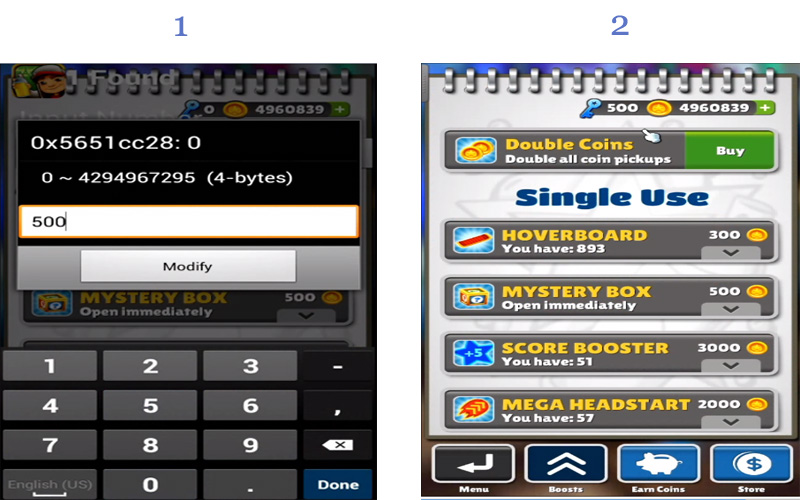
How To Hack Any Game On Your Android Smartphone
That's it game hacking is done, Now you can access any resources using this hack.
So above is all about Hack Any Game On Android. With the help of this trick, you can alter any coins, lives, money, weapons power and lots more in any of your favorite android game and can enjoy the unlimited game resources according to your wish.
Using Game Guardian
Game Guardian Apk is one of the best apps which you can have on your Android smartphone. With the help of this app, you can easily get unlimited coins, gems and can perform all other hacks. However, Game Guardian Apk needs a rooted Android smartphone to work. Here's a simple guide that will help you.
Step 1. First of all, you need to download the latest version of Game Guardian on your Android smartphone from the given download link above or below.
Step 2. After downloading on your smartphone, you need to enable the Unknown Source on your device. For that, you need to visit Settings > Security > Unknown Sources
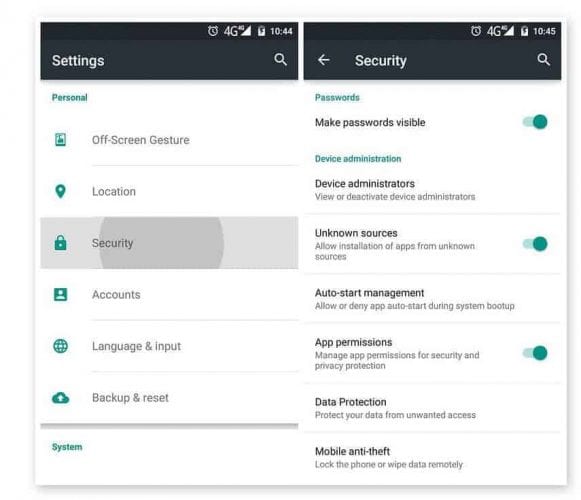
Using Game Guardian
Step 3. Now install the app and then press the home button to minimize the app. Now open any game that you want to hack. You will see an overlay of Game Guardian App icon. Tap on it.
Step 4. Now you need to tap on the Search Button and set the value. If you don't know the values, then simply set it to auto.

Using Game Guardian
Step 5. You need to search for the value which you want to hack like money, gem, health, score etc. You can change all those values. Suppose, if you need to decrease the number of values, you need to scan again for the new value.

Using Game Guardian
Step 6. Finally, you need to select all the values and then change it to infinite numbers like '9999999' or whatever you want.

Using Game Guardian
That's it, you are done! This is how you can use Game Guardian Apk to hack games on your Android smartphone.
With this, you can play a game at any levels without any shortage of any resource that can interrupt your gameplay. Hope you like this coolest android game hack. Don't forget to share it with others too.
Continue reading
HOW TO BECOME A CERTIFIED ETHICAL HACKER
7 Tips to become a hacker?
It is very important for a hacker to learn different types of programming language such as C,C++,Python,Java,PHP etc and it is also necessary to learn hardware and networking for a good hacker because these skill are very useful to become a successful hacker.

It is very important for a hacker to learn different types of programming language such as C,C++,Python,Java,PHP etc and it is also necessary to learn hardware and networking for a good hacker because these skill are very useful to become a successful hacker.
1-Programming Language are essential to becoming a good hacker
2-Networking skills is important to becoming an effective hacker.
3-SQL language are essential to becoming an effective hacker
4-Internet surfing is also essential for becoming a hacker for gathering information.
5-Cryptography is essential to becoming a certified hacker from which a hacker can share his/her readable data to other person in a nonreadable form with the help of Cryptography.
6-Penetration testing is also important for a hacker.
7-experiment a lot is also very useful to becoming a ethical hacker.
Follow me on insta_anoymous_adi
More articles
martes, 21 de abril de 2020
informaciones sobre email marketing
Buenos dias
Mi nombre es Fabián Torre y técnico en EmailMarketing.
Me agradaria saber si les interesa recibir informaciones sobre
productos y servicios de EmailMarketing, y a que email puedo enviarlas.
Muchas gracias
Whatsapp: +55 719 9313-1792
Skype: chronskype
Mi nombre es Fabián Torre y técnico en EmailMarketing.
Me agradaria saber si les interesa recibir informaciones sobre
productos y servicios de EmailMarketing, y a que email puedo enviarlas.
Muchas gracias
Whatsapp: +55 719 9313-1792
Skype: chronskype
Suscribirse a:
Entradas (Atom)