miércoles, 6 de mayo de 2020

Top 20 Best Free Hacking Apps For Android |2019|

 20 Best Free hacking apps For Android |2019|. 

Android is now one of the most popular operating systems. So, hackers have also started using Android devices for their tasks. Now Android devices are used for penetration testing and other hacking activities including IT security administrator, Wi-Fi hacking and network monitoring. There are several hacking apps or Android devices. So, we have curated a list of best hacking apps for Android.


Before you start using these apps, you must take a backup of your important data. I also recommend the use of these apps on a separate device. Using this on your primary phone is not recommended. It is because many of these apps require a rooted device and app can also harm your phone.


Note: Hacking apps can be used for educational and malicious purpose. But we never encourage malicious operations. We are listing the apps here just for educational purpose. You should only use these apps to learn. We do not support any unethical use of these apps.

1.  AndroRAT

AndroRAT stands for Android RAT. RAT is the short form of Remote Administrative Tool and it allows an attacker to remotely control and fetch information from a device. AndroRAT does the same thing. It has a server developed in Java/Swing but the Android application has been developed in Java Android.

AndroRAT allows you to connect information like call logs, contacts, messages, location and more. You can remotely monitor sent and received messages send texts, use the camera, open a URL in the browser, make phone calls and remotely monitor the device.

The connection to the server can be triggered by an SMS or a call. From the server GUI, you can check all the connected clients and access information.

As the app allows silent remote access, it is not available on Play Store.

                Download APK

2. zANTI

zANTI is a known penetration testing suite of applications you can install locally on Android smartphone. This tool brings scanning tools Diagnostic features and Reporting tools. You can use this malicious software to attack a network and check for any loopholes in your network. This tool is used to test redirect and SSL stripping attacks. You can edit request and response messages from web servers, the host takes websites from your Android phone and more.


                  Download 

3. FaceNiff

FaceNiff is another good Android hacking that allows you to intercept the traffic of your WiFi network. You can use this tool to snoop what people are doing on the network you are. You can snoop on services like Facebook, Twitter, Amazon, YouTube and more. This is one of the notable too for steal cookies from the WiFi network and gives the attacker unauthorized access to other people's account.

This app requires a rooted device. So, you can only use the app if you have a rooted phone.

Download APK

4. Droidsheep

Droidsheep is also a similar app that helps security analysts understand what is happening in your Wi-Fi network. Like Face Sniff, this app can also hijack the web session profiles over a network and supports most of the services and websites.

The primary difference between Droidsheep and FaceSniff is that Droidsheep works with almost all the websites while FaceSniff has limited support.

                     Download APK

5. Hackode

Hackode is another good hacking apps for Android. It is not a single app but a collection of tools for ethical hackers and penetration testers. The app comes with three modules including Reconnaissance, Scanning and Security Feed. You can use this app for SQL Injection, Google hacking, MySQL Server, Whois, Scanning, DNS Dif, DNS lookup, IP, MX Records, Security RSS Feed, Exploits etc.

The app is still in beta, but available in Play Store.

                  Download Here

6. cSploit

cSploit is also a good security tool for Android. It comes with several options like cracking Wi-Fi password, installing backdoors, finding vulnerabilities and their exploits. If you are looking for a good hacking app or hacker app for Android, you should try this one for sure.

                  Download APK

7. DroidBox

DroidBox is also a similar kind of app that allows you to do the dynamic analysis of Android applications. You can use this app to get information like hashes of APK package, network traffic, SMS & phone calls, Incoming/outgoing network data, Listing broadcast receivers and more.

                    Download

8. Nmap

If you are into security or hacking, I am sure you already know the name of this too. Like the desktop tool, Nmap for Android also allows you to scan

It works on both on non-rooted and rooted phones. If you are a beginner, you should try this app and learn from it.

                      Download

9. SSHDroid

SSHDroid is SSH tool developed for Android. It lets you connect to a remote computer and run terminal commands, transfer and edit files. The app also provided features like shared-key authentication, WiFi autostart whitelist, extended notification control etc,

This app is available on Play Store.

                    Download

10. Kali Linux NetHunter

Kali Linux NetHunter is an open source penetration testing platform for Android. It officially supports Nexus and OnePlus devices. It provides the ultimate penetration testing platform that allows you to perform a wide range of attacks.

                     Download

11. APKInspector

APKInspector allows you to perform reverse engineering on an APK. you can use this to get a deep insight or APK and get the source code of any Android app. You can do modifications in the APK and visualize the DEX code to erase the credits and license.

                 Download APK

12. Shark for Root

Shark for Root is an advanced hacking tool for security experts and hackers. It can work as a traffic snipper. You can use the tcpdump command on rooted devices. It works on Wi-Fi, 3G, and FroYo tethered mode.

                    Download

13. dSploit

dSploit is an Android network penetrating testing suit. You can download and install it on your device to perform network security testing. It supports all Android devices running on Android 2.3 Gingerbread or higher. You need to root this phone for using the app. After rooting the phone, you need to download BusyBox from Google Play Store

The app comes with several modules including Port Scanner, Inspector, RouterPWN, Trace, Login Cracker, Packet Forger, Vulnerability Finder, and MITM.

                      Download

14. WPScan

WPScan is a WordPress vulnerability scanner for Android. This app is used to scan WordPress based websites and find possible vulnerabilities. WPScan is a popular desktop tool but this WPScan for Android is not related to that. So, do not think of it as an official WPScan app.

                      Download

15. Network Mapper

Network Mapper is a network scanner tool for network admins. It used to scan the network, lists all devices connected and find Open ports of various servers like FTP servers, SSH servers, SMB servers etc on the network. The tool is available on Play Store.

                     Download

16. Andosid

Andosid is like LOIC for the desktop. This tool is used to perform DOS attacks from Android mobile phones. You can use this tool to set a target URL and perform a DOS attack in one click. The tool will start flooding target URL with fake requests.

                     Download

17. DroidSQLi

DroidSQLi app allows attackers to perform SQL Injection on a target URL. You just need to find a target URL and this tool will start the fully automated SQL Injection attack.

                     Download

18. AppUse

AppUse is a Virtual Machine developed by AppSec Labs. It is a freely available mobile application security testing platform that comes with lots of custom made tools by AppSec Labs. If you want to sue your Android phone as your penetration testing tool, this one is for you.

                   Download

19. Network Spoofer

Network Spoofer is also a good hacking app for android. It lets you change the website on other people's computer from your Android phone. Connect to a WiFI network and then choose a spoof to use with the app. this tool is to demonstrate how vulnerable a network is. Do not try this on any unauthorized networks.

                 Download

20. DroidSheep Guard

As the name suggests, DroidSheep Guard works against DroidSheep. It monitors Android devices' ARP-table and tries to detect ARP-Spoofing attack on your network. It does not require a rooted device.

               Download


@EVERYTHING NT


Related posts
  1. Significado De Hacker
  2. Hacking Y Seguridad
  3. Curso Completo De Hacking Ético
  4. Whatsapp Hacking

How To Control Android Phone From Another Phone Remotely

How to control Android phone From another phone Remotely

If you wish to remotely control Android phone from another phone, then you have come to the right place. It might sound surprising, but now you can easily control Android from Android by using the right kinds of applications. This can let you keep a strict eye on your kids, spouse, or anyone else remotely. In this informative post, we will make you familiar with different Android to Android remote control apps. Also, we will provide a stepwise solution to use an Android tracking app as well. Let's uncover them by taking one step at a time.

Control Android Phone from Another Phone Remotely

There could be numerous reasons to control Android from Android remotely. In most of the cases, it is used by professionals to access a device over the air. Also, parents like to use an Android to Android remote control at times to get a complete access to their kid's smartphones. Sometimes, it can help us transfer files from one device to another. You can also use it to access your partner's or employee's phone at the time of needs too. In the next section, we will let you know how to remotely control Android phone from another phone.

Control android from another android

How to remotely control Android phone from another phone?

There are different readily available applications that can be used to remotely control Android phone from another phone. We have picked the 3 best tools here.

1. TeamViewer for Remote Control

TeamViewer is one of the most widely known solutions that can provide a remote access to computer and smartphone remotely. It has a dedicated solution for Android as well that can perform the same function without any trouble. You can try its free version and later buy the premium subscription if you wish to.

  • Smart screen sharing with a complete control of the device
  • Control Android from Android by bypassing a security access (a one-time code should be matched).
  • 256 Bit AES session encoding and 2048 Bit RSA key exchange supported for advanced security
  • File transfer is also supported

Compatibility; Android 4.0 and later versions

Get it here >>

Control android from android - TeamViewer for Remote Control

2. RemoDroid

RemoDroid is another smart and lightweight Android to Android remote control that you can use. Besides controlling an Android phone, you can also use this tool to control a TV and other smart devices from your Android device as well.

  • Easy screen sharing provision
  • You can remotely control Android phone from another phone and other smart devices (like a TV)
  • It supports screen sharing between multiple users
  • Password protected and supports one-time authentication
  • Advanced features require root access

Compatibility: Android 4.0 and up

Get it here >>

Control android from android - RemoDroid

3. Inkwire Screen Share and Assist

Inkwire is a highly useful app that every Android user should have installed on their device. This freely available tool can let you share your screen with another user. After sharing the screen, you can provide assistance by marking the screen as well. It is particularly used by users to guide other how to use a certain feature on the device.

  • Once connected, you can easily draw on the screen and guide the other user on a real-time basis.
  • It is extensively used to provide customer support for Android apps.
  • Voice chat option is also included

Compatibility: Android 5.0 and later versions

Get it here >>

Control android from android - Inkwire Screen Share and Assist


@£√£RYTHING NT

Related articles

  1. Hacking Software
  2. Hacker Pelicula
  3. Mindset Hacking Español
  4. Growth Hacking Cursos
  5. Hacking Etico 101 Pdf
  6. Drupal Hacking
  7. Herramientas Hacking Etico
  8. Web Hacking 101
  9. Tools Hacking
  10. Growth Hacking Pdf
  11. Growth Hacking Courses
  12. Social Hacking
  13. Hacking Etico Pdf
  14. Tutorial Hacking
  15. Hacking Significado

Guías de Acción en los Centros de Trabajo ante covid 19

Ante la situación de emergencia ocasionada por la pandemia del COVID-19, la STPS ha publicado una Guía de Acción en los Centros
de Trabajo con una serie de recomendaciones prácticas para la planeación, capacitación, implementación, protección y monitoreo
de las medidas adoptadas para la prevención y atención del coronavirus. En esta sesión informativa, se revisarán las guías
además de ofrecer recomendaciones para lograr una implementación estratégica de las mismas.

Platica informativa:  Guías de Acción en los Centros de Trabajo ante COVID 19

Plática especial de 2 horas + sesión de preguntas y respuestas
Curso en línea en vivo | $ 1,150.00 + IVA

¡Cupo límitado!  Únicas dos fechas, inscríbete en la fecha que mejor te convenga:
Jueves 14 de mayo de 3:00 pm a 5:30 pm
Martes 19 de mayo de 9:00 am a 11:30 am

Incluye: Conexión al curso para una computadora o móvil.
Material del curso.
Reconocimiento.
Interacción en directo para resolución de dudas.

Ofreceremos información actualizada para una implementación estratégica de las Guías de Acción en los Centros de
Trabajo ante COVID 19.

Temario:

Aspectos normativos y legales.
Plan de atención y Estrategias de control.
Clasificación de Riesgo de los Trabajadores.
Clasificación del Covid-19 como enfermedad de trabajo.
Recomendaciones.

¿Te interesa este curso?
Solicita información respondiendo a este correo con la palabra Centros, junto con los siguientes datos:

Nombre:
Teléfono:
Empresa:
Correo Alterno:

¿Dudas sobre este Evento?
Centro de atención a clientes:
Llámanos al (045) 55 3016 7085 - (045) 55 1554 6630

Nuevo método de entrega, el mismo poder del aprendizaje

Buenos días,
   
¿Qué pueden hacer las empresas para mitigar el impacto de la crisis? Hemos hecho una recopilación cientos de casos de lo que ha funcionado en otros países o crisis anteriores y siempre son los mismos 5 estrategias:
  • Tener mentalidad positiva y abierta (en este momento se están formando nuevos hábitos de consumo). 
  • Innovar y cambiar (no solo en producto, también en cadena de valor, canales de venta, procesos y precios).
  • Proactivamente motivar, crear claridad y seguridad (poner a las personas y los clientes, ante todo).
  • Usar redes sociales para coordinar e involucrar a los colaboradores y clientes.
  • Prepararse para una recuperación lenta (que en algunas industrias o mercados probablemente va a durar más de 12 meses).
Y en el centro de estas cinco estrategias es la gente - que necesita estar mas apoyada, preparada y mejor dirigida que nunca.  Este es el momento en que más se necesita a los colaboradores y ellos de nosotros.
 
¿Qué hemos hecho hasta ahora? Para los clientes en México ofrecemos los siguientes compromisos. El equipo de Silega Mexico
Sinceramente,
---
55-1454-0563 CDMX
81-3849-0308 MTY
33-1580-9416 GDL

Silega Learning, Paseo de los Tamarindos No. 400 A, DF, ., 05120, Mexico

Router-Exploit-Shovel: An Automated Application Generator For Stack Overflow Types On Wireless Routers

About Router-Exploit-Shovel
   Router-Exploit-Shovel is an automated application generation for Stack Overflow types on Wireless Routers.

   Router exploits shovel is an automated application generation tool for stack overflow types on wireless routers. The tool implements the key functions of exploits, it can adapt to the length of the data padding on the stack, generate the ROP chain, generate the encoded shellcode, and finally assemble them into a complete attack code. The user only needs to attach the attack code to the overflow location of the POC to complete the Exploit of the remote code execution.

   The tool supports MIPSel and MIPSeb.Run on Ubuntu 16.04 64bit.

Router-Exploit-Shovel's Installation
   Open your Terminal and enter these commands:
Usage

   Example: python3 Router_Exploit_Shovel.py -b test_binaries/mipseb-httpd -l test_binaries/libuClibc-0.9.30.so -o 0x00478584

Router-Exploit-Shovel's screenshot

Code structure

ROP chain generation
   This tool uses pattern to generate ROP chains. Extract patterns from common ROP exploitation procedure. Use regex matching to find available gadgets to fill up chain strings. Base64 encoding is to avoid duplicate character escapes. For example:

Attackblocks
   You can get attackblocks generated in results/attackBlocks.txt. Such as:

You might like these similar tools:

Related word


Medusa: A Speedy, Parallel And Modular Login Brute-forcing Tool


About Medusa
   Medusa is a speedy, parallel, and modular, login brute-forcer. The goal is to support as many services which allow remote authentication as possible. The author considers following items as some of the key features of this application:

   Thread-based parallel testing. Brute-force testing can be performed against multiple hosts, users or passwords concurrently.

   Flexible user input. Target information (host/user/password) can be specified in a variety of ways. For example, each item can be either a single entry or a file containing multiple entries. Additionally, a combination file format allows the user to refine their target listing.

   Modular design. Each service module exists as an independent .mod file. This means that no modifications are necessary to the core application in order to extend the supported list of services for brute-forcing.

   Multiple protocols supported. Many services are currently supported (e.g. SMB, HTTP, MS-SQL, POP3, RDP, SSHv2, among others).

   See doc/medusa.html for Medusa documentation. For additional information:

Building on macOS

#getting the source
git clone https://github.com/jmk-foofus/medusa
cd medusa

#macOS dependencies
brew install freerdp
$ export FREERDP2_CFLAGS='-I/usr/local/include'
$ export FREERDP2_LIBS='-I/usr/local/lib/freerdp'

#building
./configure
make

#executing

./src/medusa
Medusa's Installation
   Medusa is already installed on Kali Linux, Parrot Security OS, BlackArch and any other Linux distros based for security pentesting purposes.

   For Debian-based distro users, open your Terminal and enter this command:
sudo apt install medusa

   For Arch Linux-based distro users, enter this command: sudo pacman -S medusa

About the author:

You might like these similar tools:
Related links
  1. Python Desde 0 Hasta Hacking - Máster En Hacking Con Python
  2. Como Hacker
  3. Curso Seguridad Informatica
  4. Hacking Smart Tv
  5. Growth Hacking Que Es
  6. Kali Hacking
  7. El Mejor Hacker Del Mundo
  8. Hacking Wikipedia
  9. Hacking Articles
  10. Aprender Hacking Etico

martes, 5 de mayo de 2020

How To Control Android Phone From Another Phone Remotely

How to control Android phone From another phone Remotely

If you wish to remotely control Android phone from another phone, then you have come to the right place. It might sound surprising, but now you can easily control Android from Android by using the right kinds of applications. This can let you keep a strict eye on your kids, spouse, or anyone else remotely. In this informative post, we will make you familiar with different Android to Android remote control apps. Also, we will provide a stepwise solution to use an Android tracking app as well. Let's uncover them by taking one step at a time.

Control Android Phone from Another Phone Remotely

There could be numerous reasons to control Android from Android remotely. In most of the cases, it is used by professionals to access a device over the air. Also, parents like to use an Android to Android remote control at times to get a complete access to their kid's smartphones. Sometimes, it can help us transfer files from one device to another. You can also use it to access your partner's or employee's phone at the time of needs too. In the next section, we will let you know how to remotely control Android phone from another phone.

Control android from another android

How to remotely control Android phone from another phone?

There are different readily available applications that can be used to remotely control Android phone from another phone. We have picked the 3 best tools here.

1. TeamViewer for Remote Control

TeamViewer is one of the most widely known solutions that can provide a remote access to computer and smartphone remotely. It has a dedicated solution for Android as well that can perform the same function without any trouble. You can try its free version and later buy the premium subscription if you wish to.

  • Smart screen sharing with a complete control of the device
  • Control Android from Android by bypassing a security access (a one-time code should be matched).
  • 256 Bit AES session encoding and 2048 Bit RSA key exchange supported for advanced security
  • File transfer is also supported

Compatibility; Android 4.0 and later versions

Get it here >>

Control android from android - TeamViewer for Remote Control

2. RemoDroid

RemoDroid is another smart and lightweight Android to Android remote control that you can use. Besides controlling an Android phone, you can also use this tool to control a TV and other smart devices from your Android device as well.

  • Easy screen sharing provision
  • You can remotely control Android phone from another phone and other smart devices (like a TV)
  • It supports screen sharing between multiple users
  • Password protected and supports one-time authentication
  • Advanced features require root access

Compatibility: Android 4.0 and up

Get it here >>

Control android from android - RemoDroid

3. Inkwire Screen Share and Assist

Inkwire is a highly useful app that every Android user should have installed on their device. This freely available tool can let you share your screen with another user. After sharing the screen, you can provide assistance by marking the screen as well. It is particularly used by users to guide other how to use a certain feature on the device.

  • Once connected, you can easily draw on the screen and guide the other user on a real-time basis.
  • It is extensively used to provide customer support for Android apps.
  • Voice chat option is also included

Compatibility: Android 5.0 and later versions

Get it here >>

Control android from android - Inkwire Screen Share and Assist


@£√£RYTHING NT

Related word

Liderazgo congruente en tiempos de crisis

Me da mucho gusto saludarte.
 
Es, para mí, un placer poder invitarte a nuestro Curso en Línea "Liderazgo congruente en tiempos de crisis.", que se
estará llevando a cabo el día Miércoles 27 de Mayo con un horario de 10:00 a 17:00 hrs.(hora del centro de México)
 
Ser líder requiere de muchas habilidades: administrar, delegar, tomar decisiones, mantener visión a futuro, entre otras. Sin
embargo, muchos líderes se forman en un proceso doloroso de ensayo y error pasando por alto que son aquellos líderes que se
capacitan los que tienen mayores oportunidades de salir victoriosos. En este taller verás algunas de las habilidades blandas que son
requeridas en los líderes actuales que te ayudarán a sacar a su equipo adelante y generar los resultados esperados en su empresa.

Ejes Temáticos:
 
- Liderazgo y tipos de liderazgo.
- Confianza, compromiso y responsabilidad.
- Proactividad y correrse riesgos.
- Hábitos de los grandes líderes.

Números de Atención: (045)5515546630 - (045)5585567293 - (045)5530167085 

Solicita información respondiendo a este correo con la palabra "LCrisis", junto con los siguientes datos:
 
Nombre:
Correo electrónico:
Número telefónico:
Email Alterno:

Qué tengas un excelente día

How To Install Windscribe - The Best Free VPN On GNU/Linux Distros?


Why should you use Windscrive?
   Windscribe is well-known for their free VPN service but they also have a paid version. Only with a free account, you will get 10 countries to connect through and change your real IP address and 10GB of free traffic (if you use an email to sign up Windscribe), and unlimited devices.

   The Free version is awesome, but the Pro one is even better! With Pro version you will get Unlimited DataUnblock over 60 Countries and 110 CitiesConfig Generator (OpenVPN, IKEv2, SOCKS5), and full protection from R.O.B.E.R.T.

   For your information, Windscribe is one of the best VPN services in the category Free AuditValue Audit and Overall Audit in BestVPN.com Awards 2019 (Read the White Paper here). You totally can believe in Windscribe (100% no logs).

   And about R.O.B.E.R.T, it's an advanced DNS level blocker that protects you from MalwareAds and TrackersSocial trackingPornGamblingFake NewsClickbait and Cryptominers. Read more about R.O.B.E.R.T.


Anyway, Windscribe helps you:
  • Stop tracking and browse privately: Governments block content based on your location. Corporations track and sell your personal data. Get Windscribe and take back control of your privacy.
  • Unblock geo-restricted content: Windscribe masks your IP address. This gives you unrestricted and private access to entertainment, news sites, and blocked content in over 45 different countries.
  • Take your browsing history to your grave: Protect your browsing history from your network administrator, ISP, or your mom. Windscribe doesn't keep any logs, so your private data stays with you.
  • Stop leaking personal information: Prevent hackers from stealing your data while you use public WIFI and block annoying advertisers from stalking you online.
  • Go beyond basic VPN protection: For comprehensive privacy protection, use our desktop and browser combo (they're both free).

   Windscribe also supports Chrome browser, Firefox browser, Opera browser, Smart TV, Routers, Android, iOS, BlackBerry, Windows OS, Mac OS X and GNU/Linux OS, you name it.

   You can install Windscribe on Ubuntu, Debian, Fedora, CentOS, Arch Linux and their based distros too.

   But to install and safely use Internet through Windscribe, you must sign up an account first. If you already have an account then let's get started.

How to install Windscribe on Arch and Arch-based distros?
   First, open your Terminal.

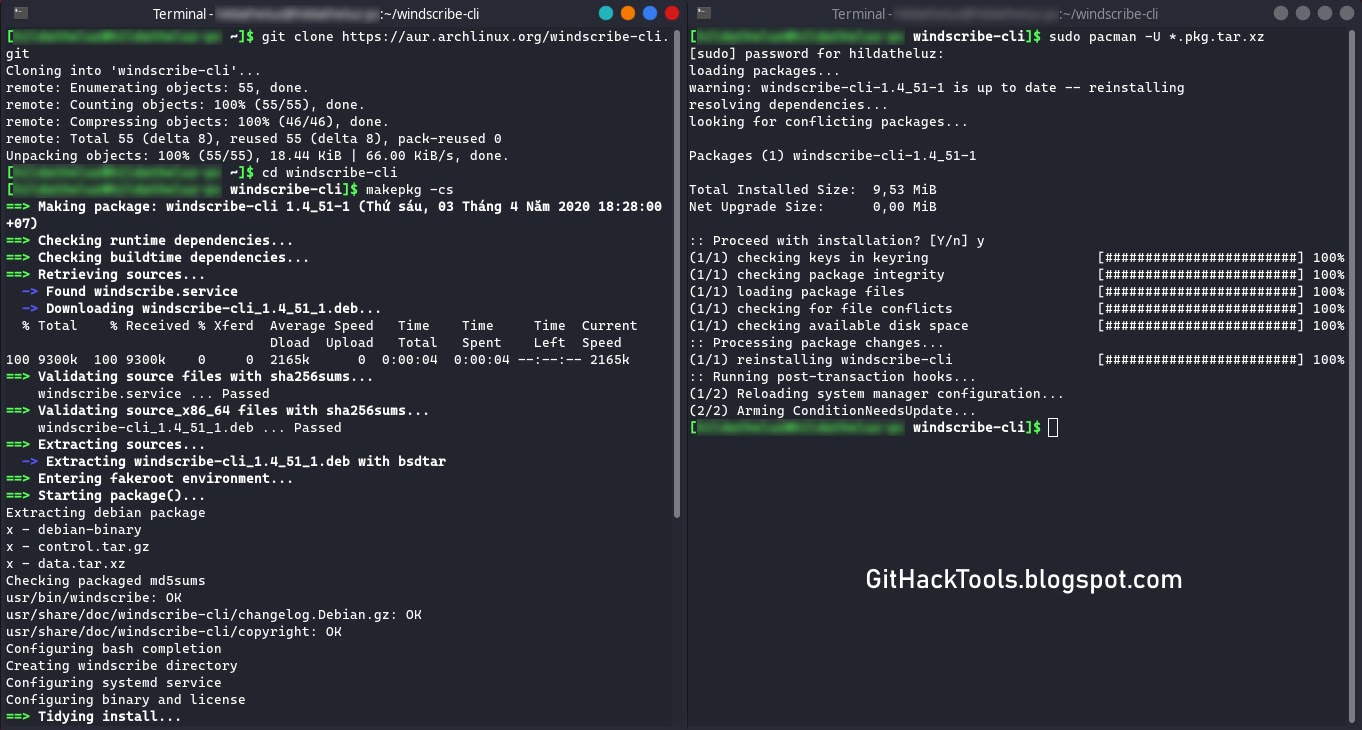
   For Arch Linux and Arch-based distro users, you can install Windscribe from AUR. Run these commands without root to download and install Windscribe on your Arch:


   For other distro users, go to VPN for Linux - Windscribe choose the binary file that compatible with your distro (.DEB for Debian and Ubuntu based, .RPM for Fedora and CentOS based) and then install it.
dpkg -i [Windscribe .DEB package]
rpm -ivh [Windscribe .RPM package]


   Or you can scroll down to Pick Your Distro, click to the distro version you use, or click to the distro version that your distro is based on and follow the instructions.

   Now enter these commands to auto-start a and log in to Windscribe.

   Enter your username and password and then you can enjoy Windscribe's free VPN service.

How to use Windscribe on Linux?
   This is Windscribe list of commands (windscribe --help):
   If you want Windscribe to chooses the best location for you, use windscribe connect best.

   But if you want to choose location yourself, here is the list of Windscribe's locations:
   *Pro only
   Example, i want to connect to "Los Angeles - Dogg", i use windscribe connect Dogg.

   If you want to stop connecting through Windscribe use windscribe disconnect.

   For some reasons, you want to log out Windscribe from your device, use windscribe logout.

I hope this article is helpful for you 😃


Related posts
  1. El Libro Del Hacker
  2. Growth Hacking Madrid
  3. Informatico Hacker
  4. Nfc Hacking
  5. Hacking Gif

lunes, 4 de mayo de 2020

RED_HAWK: An Information Gathering, Vulnerability Scanning And Crawling Tool For Hackers


About RED_HAWK: RED_HAWK is a all in one tool for Information Gathering, Vulnerability Scanning and Crawling. A must have tool for all pentesters and hackers.

RED_HAWK's features:
  • Basic ScanSite Title (NEW):
       IP Address
       Web Server Detection IMPROVED
       CMS Detection
       Cloudflare Detection
       robots.txt Scanner
  • Whois Lookup (IMPROVED)
  • Geo-IP Lookup
  • Grab Banners IMPROVED
  • DNS Lookup
  • Subnet Calculator
  • Nmap Port Scan
  • Sub-Domain Scanner IMPROVED:
       Sub Domain
       IP Address
  • Reverse IP Lookup and CMS Detection IMPROVED:
       Hostname
       IP Address
       CMS
  • Error Based SQLi Scanner
  • Bloggers View NEW
       HTTP Response Code
       Site Title
       Alexa Ranking
       Domain Authority
       Page Authority
       Social Links Extractor
       Link Grabber
  • WordPress Scan NEW
       Sensitive Files Crawling
       Version Detection
       Version Vulnerability Scanner
  • Crawler
  • MX Lookup NEW
  • Scan For Everything - The Old Lame Scanner
List of CMS Supported on RED_HAWK
   RED_HAWK's CMS Detector currently is able to detect the following CMSs (Content Management Systems) in case the website is using some other CMS, Detector will return could not detect.
  • WordPress
  • Joomla
  • Drupal
  • Magento

RED_HAWK Installation
   How To Configure RED HAWK with moz.com for Bloggers View Scan?
   All set, now you can enjoy the bloggers view.

How to use RED_HAWK?

Known Issues of RED_HAWK
   ISSUE: Scanner Stops Working After Cloudflare Detection!
   SOLUTION: Use the fix command (for Debian-based distros) or manually install php-curl and php-xml.

   Watch the video to see how to solve that isuue:

Support and Donations
   Found RED_HAWK cool? Well you could buy a cup of tea for the author 😉 Just send any amount of donations (in Bitcoin) to this address: 1NbiQidWWVVhWknsfPSN1MuksF8cbXWCku

   Can't donate? well that's no problem just drop a "THANK YOU, AUTHOR" this will motivate me to create more exciting stuffs for you 😉

TODOs for RED_HAWK:
  • Make a proper update option ( Installs current version automatically )
  • Add more CMS to the detector
  • Improve The WordPress Scanner ( Add User, Theme & Plugins Enumeration )
  • Create a web version of the scanner
  • Add XSS & LFI Scanner
  • Improve the Links grabber thingy under bloggers view
  • Add some other scans under the Bloggers View


Related news